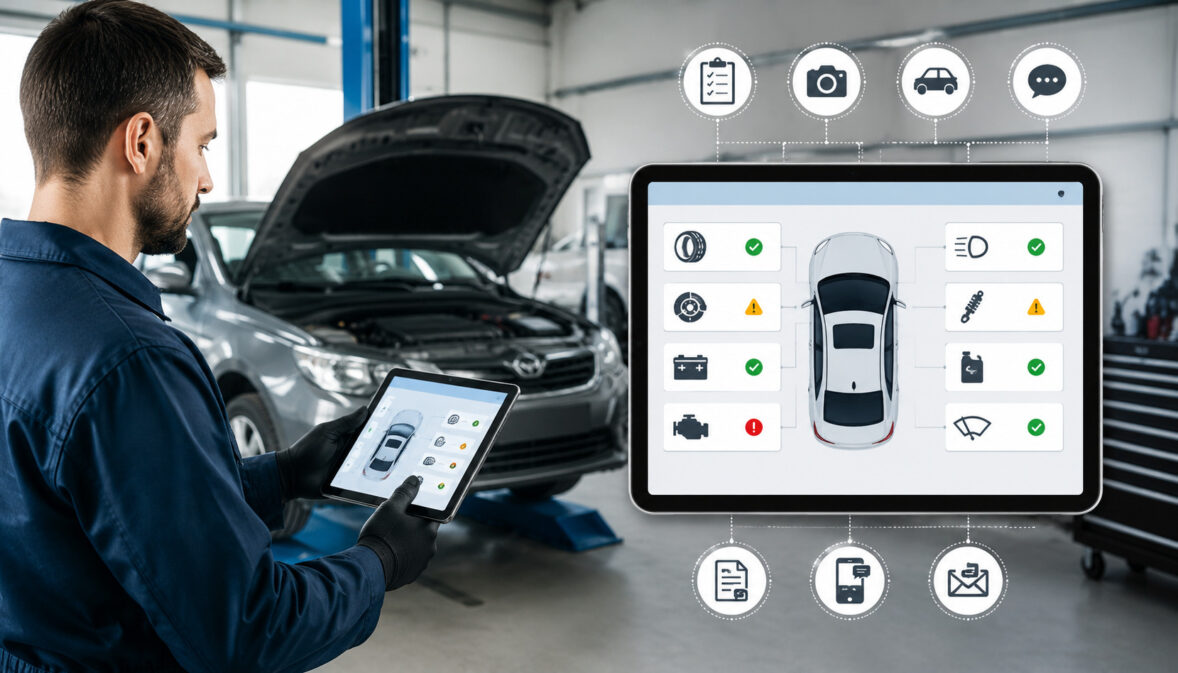
Digital Vehicle Inspections (DVIs) Explained: A Practical Guide for Auto Repair Shops
Digital vehicle inspections are changing how auto repair businesses document vehicle condition, explain repair recommendations, and communicate with customers.
Instead of relying only on handwritten notes, verbal explanations, or printed inspection sheets, a shop can use digital inspection reports with photos, videos, technician notes, severity ratings, and recommended services.
For shop owners, service advisors, technicians, dealership service teams, mobile mechanics, tire stores, specialty repair shops, and fleet service providers, DVIs can make inspections more consistent and easier to understand. They can also help customers see what the technician sees, which is often the missing piece in repair conversations.
A digital vehicle inspection is not just a form on a tablet. It is a workflow. It connects vehicle intake, multipoint inspection, documentation, estimate creation, repair authorization, invoicing, declined service tracking, and future follow-up.
When used well, digital vehicle inspection software can improve repair transparency, customer education, internal accountability, and service quality.
At the same time, DVIs are not automatic fixes for every shop problem. Results can vary based on technician training, inspection checklist quality, service advisor communication, software setup, customer expectations, shop type, staffing, service mix, and operational execution.
A strong DVI process supports better decisions, but it still depends on people using the system consistently.
What Are Digital Vehicle Inspections?
Digital vehicle inspections are electronic inspections that allow technicians to document the condition of a vehicle using a phone, tablet, or workstation instead of a paper form. A technician can complete a digital vehicle inspection checklist, attach digital photos, record inspection videos, add notes, assign severity ratings, and recommend repairs or maintenance services.
The finished inspection becomes a digital inspection report. That report can usually be reviewed by the service advisor, attached to a repair order, shared with the customer by text messaging or email updates, and used to support repair estimates.
In many shops, DVI software is connected to shop management software, work orders, repair orders, invoicing, customer communication tools, and digital records.
A traditional multipoint inspection often depends on checkmarks, abbreviations, and a quick explanation at the counter. A digital inspection adds visual proof and structure.
Instead of saying, “Your front brakes are low,” the shop can show a clear photo of the brake pad measurement, explain the concern, categorize the recommendation, and include it in the estimate.
Digital vehicle inspections are used in independent repair shops, dealership service departments, tire shops, mobile mechanic operations, specialty repair businesses, and fleet maintenance programs. A small mechanic shop may use DVIs to improve trust and reduce phone tag.
A larger multi-bay shop may use auto repair inspection software to manage technician workflow, bay utilization, quality control, and KPIs. A fleet service provider may use vehicle inspection software to maintain digital records, track recurring defects, and support preventive maintenance planning.
DVIs also support customer education. Many customers do not understand automotive systems deeply, and they may hesitate when repairs are explained only verbally. A digital report with photos, videos, and clear repair recommendations gives the customer more context.
The Federal Trade Commission’s consumer guidance on auto repair basics also emphasizes the value of understanding repair needs and asking informed questions, which aligns with the transparency goals of a strong DVI process.
Why Digital Vehicle Inspections Matter for Auto Repair Shops
Digital vehicle inspections matter because they address one of the biggest friction points in auto repair: trust. Customers often know they need expert help, but they may not know how to evaluate repair recommendations.
When a service advisor explains several issues over the phone, the customer may feel rushed, confused, or skeptical. A digital vehicle inspection can reduce that uncertainty by showing evidence and organizing information.
For an auto repair shop, DVIs help create a documented process. Instead of every technician inspecting vehicles differently, the shop can build a repeatable digital inspection workflow. That improves consistency across the team.
It also helps managers see whether inspections are being completed properly, whether photos are useful, and whether recommendations are being communicated clearly.
Digital inspections for auto repair shops can also support better repair approvals. That does not mean approvals are guaranteed. It means the customer has more information when deciding.
A customer who sees a leaking shock, cracked belt, worn tire edge, or contaminated fluid may better understand why the repair estimate includes that service. The service advisor can have a more productive conversation because the report already provides context.
DVIs also help preserve service history. When a customer declines work, the declined services can be saved for follow-up reminders. If the same vehicle returns later, the advisor can review past inspection reports and explain what changed.
This supports preventive maintenance, comeback prevention, customer retention, and more professional customer communication. From a management perspective, automotive inspection software can reveal performance patterns.
A shop owner or manager may track inspection completion rate, inspection conversion rate, repair approval rate, average repair order, declined service follow-up rate, comeback rate, technician productivity, and customer review trends. These KPIs help leaders identify whether the process is working or where it needs improvement.
DVIs are also useful for compliance documentation and internal quality control. While a digital inspection report does not replace legal, safety, warranty, or regulatory requirements, it can create a clearer record of what was inspected, documented, recommended, approved, declined, and completed.
Shops that perform collision, body, or refinishing work should also remain aware of workplace safety responsibilities; OSHA provides educational information about hazards in autobody repair and refinishing, including chemical and physical hazards that may affect shop operations.
How the Digital Vehicle Inspection Process Works

A strong automotive DVI process follows the vehicle from intake to follow-up. The exact workflow may vary by shop, but most digital vehicle inspections include several core steps: intake, inspection assignment, technician documentation, advisor review, customer report delivery, estimate approval, repair authorization, billing, and future follow-up.
Vehicle Intake
Vehicle intake is where the DVI process begins. The service advisor collects customer concerns, verifies contact information, confirms communication preferences, reviews service history, and opens the work order or repair order. This step matters because the quality of the intake affects the quality of the inspection.
For example, a customer may say the vehicle “makes noise when braking.” A stronger intake note would include when the noise happens, whether it occurs at low speed or highway speed, whether it changes after rain, and whether warning lights are present. The technician can then inspect with better context.
During intake, the advisor may also confirm whether the customer wants text messaging, email updates, or phone calls. This is important because digital inspection reports are often sent through a link. If the contact information is wrong, the DVI may sit unread while the vehicle waits in the bay.
A good intake process may include:
- Customer name and preferred contact method
- Vehicle identification and mileage
- Primary concern or requested service
- Prior recommendations or declined services
- Warranty, fleet, or account notes
- Authorization limits or approval preferences
- Drop-off time, promised time, and transportation needs
Multipoint Inspections
The multipoint inspection is the structured review of the vehicle. A digital vehicle inspection checklist may include tires, brakes, fluids, lights, belts, hoses, suspension, steering, battery, filters, leaks, undercarriage, safety items, and maintenance recommendations.
Specialty shops may add sections for diagnostics, drivability, alignment, diesel systems, hybrid systems, performance upgrades, or fleet-specific requirements.
Digital inspection software usually allows shops to categorize items by condition. Many systems use green, yellow, and red categories. Green may mean the item passed. Yellow may mean future attention or maintenance planning.
Red may mean urgent safety, reliability, or drivability concern. The categories should be defined clearly so technicians and advisors apply them consistently.
A multipoint inspection should not become a random list of every possible upsell. Customers can become overwhelmed when a report includes too many recommendations without context. The better approach is to document accurately, prioritize clearly, and explain why each recommendation matters.
For a tire shop, the inspection might focus heavily on tire wear, tread depth, alignment wear patterns, TPMS concerns, brakes, and suspension items.
For a dealership service department, the inspection may include factory maintenance intervals, warranty-related observations, recall-related notes when applicable, and customer-pay recommendations. For a mobile mechanic, the inspection may focus on what can be safely verified at the customer’s location.
Technician Inspection Workflow
The technician inspection workflow should be efficient enough to fit real shop conditions. If the DVI checklist is too long, unclear, or poorly organized, technicians may rush through it or treat it as an administrative burden. If it is too short, the shop may miss important documentation opportunities.
A practical digital inspection workflow usually follows the technician’s natural movement around the vehicle. For example, the checklist can begin with exterior condition and lights, move to underhood items, then tires and brakes, then undercarriage, then road-test or diagnostic notes if applicable. This reduces wasted motion and supports technician productivity.
Technicians should know when photos are required, when videos are helpful, and what notes should include. A blurry photo of a worn part may not help the customer. A clear photo with a short note explaining the concern can support customer education and advisor communication.
The technician should also know how to distinguish between inspection findings and diagnosis. A DVI may document that a fluid leak is present. A diagnostic procedure may be needed to confirm the source. Mixing those together can create confusion if the report implies certainty before proper testing.
Key Features of Digital Vehicle Inspection Software

Digital vehicle inspection software can range from simple mobile inspection forms to advanced auto shop inspection software connected to repair orders, estimates, customer messaging, reporting, and invoicing. The right feature set depends on the type of automotive business and the problems the shop is trying to solve.
At a minimum, DVI software should make it easy to create inspection checklists, capture photos and videos, add technician notes, organize findings by severity, send digital inspection reports, and save records.
More advanced systems may support canned recommendations, estimate building, parts lookup, labor operations, customer approvals, declined service tracking, KPI reporting, and shop management software integration.
Mobile inspection forms are especially important for technicians. A tablet inspection should be fast, reliable, and easy to use with dirty hands, gloves, limited bay space, and a busy repair schedule. If the system takes too many taps or requires repeated loading screens, technicians may resist it.
Service advisors need a different set of features. They need to review inspection results quickly, edit customer-facing wording when needed, build repair estimates, send reports, track customer views, record approvals and declines, and communicate next steps. The advisor view should help them prioritize conversations rather than bury them in technical clutter.
Managers need reporting. DVI reporting can help track inspection completion rate, technician participation, average number of photos per inspection, estimate approval rate, average repair order, declined service follow-up, and customer response time.
These metrics can help identify whether the shop has a DVI process issue, a training issue, a communication issue, or a software setup issue.
Integration matters, too. A DVI process works best when it connects with work orders, repair orders, estimates, invoicing, payment processing, customer records, and service history. Disconnected systems can still work, but they often create duplicate data entries.
Shops researching broader software operations may find related guidance on cloud software solutions for auto businesses useful because DVI tools often perform best when they are part of a connected service workflow.
How DVIs Improve Customer Trust and Repair Transparency

DVIs improve customer trust by making repair recommendations easier to see, understand, and verify. Trust is not built by overwhelming customers with technical language. It is built by showing relevant evidence, explaining the concern clearly, and giving the customer a reasonable path to make a decision.
Repair transparency starts with documentation. A customer may not understand why a brake service is recommended until they see a photo of low pad thickness or uneven rotor wear.
They may not understand why an alignment is suggested until they see tire wear patterns. They may not understand why a coolant leak matters until they see the leak location and hear what could happen if it is ignored.
Digital inspection reports can also reduce the feeling that recommendations are being invented at the counter. The customer receives a structured report with inspection categories, notes, photos, videos, and recommended services. That creates a more professional experience than a rushed phone call.
Customer trust also depends on prioritization. A DVI should help customers understand what needs attention now, what should be planned soon, and what can be monitored. If every recommendation is presented as urgent, the customer may lose confidence. A balanced report respects the customer’s budget and decision-making process.
Service advisors play a major role here. The digital inspection report supports the conversation, but it does not replace the advisor. A good advisor translates the technician’s findings into customer-focused explanations. They connect the issue to safety, reliability, maintenance, comfort, performance, or long-term cost where appropriate.
DVIs also help with online reviews and customer experience, but not automatically. Customers are more likely to respond positively when they feel informed and respected. If the report is confusing, too aggressive, or poorly explained, the technology can have the opposite effect.
For broader operational context, technology trends shaping automotive businesses can help shops think about how digital tools affect customer expectations, internal workflows, and service delivery.
Digital Photos, Videos, and Inspection Notes Explained
Digital photos, videos, and notes are the heart of many digital vehicle inspections. They help bridge the gap between what the technician sees in the bay and what the customer understands outside the shop.
Digital Photos
Digital photos are useful when they are clear, relevant, and tied to a specific recommendation. A photo should show the condition being discussed, not just a random close-up of a part.
If a technician documents a leaking valve cover gasket, the image should show the leak area clearly. If the inspection notes mention tire wear, the photo should show the tread condition or wear pattern in a way the customer can understand.
Good photos often include context. A photo of a brake pad may be more helpful when it includes a gauge or comparison. A photo of a dirty cabin air filter is easier to understand when the customer can see the debris. A photo of a cracked belt should show the cracking clearly, not just the belt from far away.
Photos can also support quality control. If a customer later asks why a recommendation was made, the shop has a digital record. If a vehicle returns for a related concern, the service advisor can review prior images and compare condition changes.
However, photos should be used thoughtfully. Too many images can overwhelm customers. Poor photos can create confusion. Shops should train technicians on basic photo standards, including focus, lighting, angle, distance, and what to avoid capturing.
Inspection Videos
Inspection videos can be especially helpful for moving parts, noises, leaks, suspension play, exhaust issues, tire movement, and undercarriage concerns. A short video may explain a problem better than several photos. For example, showing a loose ball joint movement can help a customer understand why the recommendation matters.
Videos should be short and purposeful. A customer does not need a long recording of the entire undercarriage. They need a clear clip showing the issue and, when appropriate, a short verbal or written explanation. Shops should also avoid making the video too technical unless the customer is likely to understand it.
Videos are useful for mobile mechanics and fleet service providers as well. A fleet manager may not be present when the vehicle is inspected, but a video can document a defect and support repair authorization.
For mobile service, videos can help explain limitations when a technician cannot fully inspect something without additional equipment or shop access.
Like photos, videos need standards. The shop should decide when video is required, when it is optional, and what should be included. Poorly lit, shaky, or unclear videos can reduce confidence.
Inspection Notes
Inspection notes translate visual evidence into useful information. A good note should explain what was found, where it was found, why it matters, and what is recommended. It should be concise but complete enough for the advisor and customer to understand.
For example, “leak” is not enough. A stronger note might say, “Oil seepage visible around valve cover area. Recommend cleaning and further inspection to confirm source before repair estimate.” That wording avoids overstating certainty and gives the customer a logical next step.
Notes should also separate observations from conclusions. If the technician has confirmed the failure, the note can say so. If further testing is needed, the note should make that clear. This protects the shop from miscommunication and helps the advisor explain the estimate accurately.
How DVIs Support Repair Estimates and Customer Approvals
Digital vehicle inspections support repair estimates by giving the estimate context. An estimate without explanation can feel like a list of charges. An estimate connected to a DVI report shows what the technician found, why the repair is being recommended, and how urgent the issue may be.
Repair Recommendations
Repair recommendations should be organized in a way that helps the customer decide. Many shops group recommendations into categories such as urgent repairs, maintenance due soon, items to monitor, and optional services. This structure is more helpful than presenting one long list without priority.
For example, a customer may come in for an oil change. The DVI finds low front brake pads, a dirty cabin air filter, minor oil seepage, and tires nearing replacement. A good report does not treat all four items the same. It explains which item affects safety, which affects comfort, which needs monitoring, and which may require planning.
Repair recommendations should be tied to inspection evidence. If the report recommends a battery replacement, include test results or relevant notes. If it recommends tires, include tread depth and wear pattern. If it recommends brake work, include measurements where appropriate.
This approach can improve estimate approvals because the customer is making a more informed decision. It can also reduce uncomfortable advisor conversations because the recommendation is supported by documentation.
Customer Approvals
Customer approvals are a key part of the digital inspection workflow. Many DVI systems allow customers to review the report, approve or decline recommended services, and authorize repairs electronically.
Some shops still complete final authorization by phone, especially for larger repairs or complex diagnostics, but the digital report makes the conversation easier.
The approval process should be clear. Customers should know what they are approving, what it costs, whether taxes or fees are included, whether parts availability affects timing, and what happens next. Digital authorization can support recordkeeping, but it should not be confusing or rushed.
Service advisors should follow up quickly after sending the report. A customer may not open the link right away, may have questions, or may need help prioritizing. A slow follow-up can reduce the value of the DVI because the vehicle sits while the customer is unsure what to do.
Repair Estimates, Invoicing, and Payments
A digital vehicle inspection often flows into the repair estimate. Once the customer approves work, the approved services can move into the repair order, parts can be ordered, labor can be assigned, and the final invoice can be prepared more accurately.
The connection between inspection, estimate, approval, and payment matters because customers expect a smooth process. A strong workflow reduces duplicate entry and helps prevent differences between what was recommended, what was approved, and what was billed.
Payment processing also plays a role in the complete customer experience. Shops that send digital estimates may also send digital invoices or payment links after work is completed. Educational resources on auto repair shop payment systems can help shop owners understand how invoicing, checkout, and payment operations fit into the broader service workflow.
Using DVIs to Improve Technician Workflow and Shop Efficiency
Digital vehicle inspections can improve technician workflow when they are designed around real shop operations. They can also hurt productivity if the process is poorly configured. The goal is to create a digital inspection workflow that helps technicians document accurately without slowing down the bay.
A well-designed DVI process reduces confusion. Technicians know which inspection checklist to use, which photos are required, how to mark severity, when to add notes, and how to submit findings. Service advisors know when the inspection is complete, what needs review, and which recommendations should be converted into estimates.
Bay utilization can improve when work moves faster from inspection to approval. If a technician completes the DVI and the advisor reviews it promptly, the estimate can be sent while the vehicle is still positioned for efficient work. If the advisor waits too long, the vehicle may block a bay while the shop waits for approval.
DVIs also help managers see bottlenecks. If inspections are completed but estimates are delayed, the issue may be at the advisor stage.
If reports are sent but customers do not approve work, the issue may be communication quality, pricing clarity, timing, or recommendation prioritization. If technicians skip sections, the issue may be checklist design, training, or workload.
Quality control is another benefit. A shop can review completed inspections to confirm that technicians are documenting consistently. Managers can identify weak photos, vague notes, missed checklist items, or recommendations that lack support. This helps with comeback prevention and staff coaching.
Multi-bay repair shops may use DVI reporting to compare inspection completion rates by technician or team. Tire shops may track how often alignment-related findings are documented.
Fleet service providers may track recurring defects by vehicle, route, driver, or asset type. Specialty shops may use DVIs to document pre-existing condition before performance work, diagnostic work, or custom installations.
Digital Vehicle Inspections and Customer Communication
Customer communication is where DVIs often succeed or fail. A digital inspection report can be accurate, but if the advisor does not explain it well, the customer may still feel confused. The DVI should support a better conversation, not replace it.
Service advisor communication begins before the inspection is sent. At intake, the advisor can tell the customer that the shop will inspect the vehicle and send a digital report with findings. This prepares the customer to look for the report and understand its purpose.
When the report is ready, the advisor should avoid simply sending a link with no context. A short message can help: “We completed the inspection and found a few items to review. The report includes photos and notes. I’ll call shortly to walk through the priorities.” That tells the customer what to expect.
Text messaging is useful because many customers respond faster to texts than calls, but some customers still prefer phone or email updates. The shop should respect communication preferences when possible.
Fleet managers may prefer email summaries. Busy retail customers may prefer text links. Older customers or customers with complex repairs may prefer a phone explanation.
Customer education should be balanced. The advisor should explain what was inspected, what passed, what needs attention, what can be monitored, and what the customer’s options are.
The best conversations connect recommendations to the customer’s needs. A commuter, rideshare driver, fleet operator, parent, or performance enthusiast may evaluate priorities differently.
Follow-up reminders are also part of communication. If a customer declines services, the shop should document the reason when possible and create a follow-up plan. Declined work should not be forgotten. A reminder can be sent later with reference to the prior DVI, especially for maintenance recommendations or monitored concerns.
Online scheduling also supports communication. If a customer receives a follow-up reminder for declined services, an easy scheduling path can reduce friction. Shops improving appointment workflows may find this related guide on online scheduling tools for auto repair shops helpful.
Common DVI Implementation Mistakes to Avoid
Digital vehicle inspections can produce disappointing results when shops focus on software before process. The tool matters, but implementation matters more. Many DVI problems are caused by unclear expectations, weak training, poor checklist design, or inconsistent customer communication.
One common mistake is using a checklist that is too generic. A quick template may be a useful starting point, but every shop should adjust its digital vehicle inspection checklist for its service mix. A tire shop, diesel repair shop,
European specialty shop, dealership service department, mobile mechanic, and fleet maintenance provider do not need identical inspection workflows.
Another mistake is requiring too many photos without explaining why. Technicians may start attaching low-quality images just to satisfy the requirement. Customers may receive cluttered reports. It is better to require photos for failed or recommended items and train technicians on what useful documentation looks like.
Shops also make the mistake of sending too many recommendations without prioritization. A customer who sees a long list of red items may feel pressured or distrustful. Severity ratings should be applied consistently and honestly. Not every maintenance opportunity is urgent.
Weak service advisor follow-up is another major issue. Some shops send digital inspection reports and wait. Customers may not open the link, may not understand the recommendations, or may have questions. The advisor should monitor report views and follow up promptly.
Lack of software integration can also create friction. If the DVI does not connect with repair orders, estimates, invoicing, customer communication, or service history, staff may need to copy information manually. That increases the chance of errors and slows the workflow.
Staff resistance is also normal. Technicians may worry that DVIs add unpaid time. Advisors may worry about learning another system. Managers should explain the purpose, provide training, review results, and adjust the process based on real feedback.
Common mistakes include:
- Launching DVI software without staff training
- Using vague inspection categories
- Failing to define red, yellow, and green standards
- Sending unclear photos or videos
- Writing notes that are too technical or too brief
- Overloading customers with recommendations
- Delaying advisor follow-up
- Not tracking declined services
- Ignoring KPI reporting
- Treating the DVI as a one-time setup instead of an ongoing process
How to Choose the Right Digital Vehicle Inspection Software
Choosing digital vehicle inspection software should begin with workflow needs, not software demos. A shop should first identify what it wants to improve.
Is the goal better customer communication? More consistent inspections? Stronger documentation? Faster estimates? Better declined service follow-up? Improved reporting? Fleet maintenance records? Different goals may require different features.
The first consideration is ease of use. Technicians need mobile inspection forms that work smoothly in the bay. Service advisors need reports that are easy to review and send. Managers need dashboards that make performance trends visible. If the interface is confusing, adoption will suffer.
The second consideration is customization. The software should allow the shop to build or edit inspection checklists, categories, notes, severity levels, and recommendation templates.
A specialty repair shop may need different inspection areas than a general repair shop. A fleet provider may need asset-specific forms. A mobile mechanic may need a streamlined checklist designed for field conditions.
Integration is another major factor. The best auto repair DVI setup often connects with shop management software, repair orders, estimates, customer messaging, invoicing, payment processing, and service history. This helps reduce duplicate entry and keeps digital records organized.
Reporting should be practical. Look for DVI reporting that helps track inspection completion rate, estimate approval rate, average repair order, declined service follow-up rate, customer retention, comeback rate, technician productivity, and customer response patterns. The reports should help managers coach the team, not just produce numbers.
Customer experience matters as well. The digital inspection report should be easy to open, mobile-friendly, visually clear, and organized by priority. Customers should not need an account or complicated login just to view their inspection.
Training and support should be evaluated carefully. DVI software is not just a technical purchase. It affects technician workflow, advisor communication, shop management, and customer expectations. The shop should ask how onboarding works, how checklists are created, how staff are trained, and how support is handled.
For shops exploring broader operational models, especially recurring preventive maintenance, this guide on subscription-based maintenance models for auto repair shops may provide useful context for how inspection data and follow-up reminders can support long-term customer relationships.
Digital Vehicle Inspection Checklist for Auto Repair Shops
A digital vehicle inspection checklist should be practical, consistent, and customer-friendly. It should help technicians inspect the vehicle thoroughly without wasting time. It should also help service advisors explain findings clearly.
The checklist below is a sample framework. Shops should adjust it based on service type, vehicle mix, technician skill level, state or local requirements, inspection depth, software capabilities, and customer expectations.
| Inspection Area | What to Document | Why It Matters | Customer Communication Tip |
| Vehicle intake | Mileage, customer concern, warning lights, service history, prior declined services | Gives the technician context and connects the visit to the customer’s real concern | Confirm what the customer wants checked before the vehicle enters the bay |
| Tires and wheels | Tread depth, wear patterns, tire pressure, damage, rotation need, wheel condition | Supports safety, ride quality, alignment recommendations, and maintenance planning | Use measurements and photos to explain why replacement, rotation, or alignment may be recommended |
| Brakes | Pad thickness, rotor condition, brake fluid condition, visible leaks, noise concerns | Helps customers understand safety-related recommendations | Show measurements when possible and separate urgent brake concerns from future planning |
| Fluids | Oil, coolant, brake fluid, transmission fluid, power steering fluid, washer fluid where applicable | Supports preventive maintenance and leak detection | Explain whether the issue is condition, level, contamination, or leak-related |
| Battery and charging | Battery test results, corrosion, cable condition, charging output if tested | Helps prevent no-start situations and electrical complaints | Include test results rather than only saying the battery is weak |
| Belts and hoses | Cracks, glazing, swelling, leaks, age-related wear, tension concerns | Helps prevent breakdowns and cooling or charging issues | Use close-up photos for visible cracks or swelling |
| Suspension and steering | Loose components, worn bushings, leaks, ride height concerns, alignment wear signs | Affects handling, tire wear, ride comfort, and safety | Use photos or short videos to show movement or visible wear |
| Lights and visibility | Exterior lights, wipers, washer operation, mirrors, windshield concerns | Supports safety and inspection readiness | Keep recommendations practical and easy to approve when issues are simple |
| Filters | Engine air filter, cabin air filter, fuel filter if applicable | Affects airflow, comfort, performance, and maintenance | Photos of dirty filters are usually easy for customers to understand |
| Leaks and undercarriage | Oil, coolant, transmission, differential, exhaust, rust, impact damage | Helps document condition and recommend diagnosis or repair | Be clear when further diagnosis is needed to confirm the source |
| Safety items | Seat belts, horn, warning lights, visible damage, critical mechanical concerns | Helps identify issues that may affect safe operation | Avoid exaggeration; explain the specific risk and recommended next step |
| Maintenance recommendations | Services due by mileage, history, condition, or shop policy | Supports preventive maintenance and customer retention | Prioritize what is due now versus what can be planned later |
| Quality control | Final checks, completed repairs, road-test notes, fluid levels, warning lights | Helps reduce comebacks and improve service quality | Use internal notes when customer-facing details are not necessary |
| Follow-up items | Declined services, monitored conditions, future reminders | Keeps service history organized and supports retention | Schedule reminders based on urgency, mileage, or customer preference |
A good digital vehicle inspection checklist should include clear definitions for each severity rating. For example:
- Green: Inspected and appears acceptable at this visit.
- Yellow: Needs monitoring, maintenance planning, or future attention.
- Red: Needs prompt attention due to safety, reliability, performance, or confirmed failure concerns.
The shop should train staff on these definitions. If one technician marks a worn tire yellow and another marks the same condition red, customer communication becomes inconsistent. The checklist should also define when photos are required, when videos are helpful, and when advisor review is needed before sending the report.
Measuring DVI Performance With Practical KPIs
Digital vehicle inspections become more valuable when shops measure the right performance indicators. KPIs help managers understand whether the DVI process is improving workflow, communication, and service quality. They also reveal whether staff need training or whether the software setup needs adjustment.
Inspection completion rate is one of the first metrics to track. If only some vehicles receive DVIs, the shop may not be getting a consistent view of vehicle condition.
Completion rate should be evaluated by technician, advisor, job type, and customer category where useful. A shop may not need the same inspection depth for every visit, but it should know whether its process is being followed.
Estimate approval rate is another useful metric, but it should be interpreted carefully. A low approval rate may reflect unclear recommendations, weak advisor follow-up, pricing concerns, customer budget limits, poor inspection quality, or recommendations that are not well prioritized. A high approval rate is not automatically good if recommendations are incomplete or under-documented.
Average repair order can help show how DVIs affect service opportunities, but it should not be treated as the only success measure. A higher average repair order may be positive when it reflects legitimate maintenance and repair needs. It may be a problem if customers feel pressured or if recommendations are not supported by evidence.
Declined service follow-up rate is especially important. Many shops document declined services but fail to follow up. A DVI system can help create reminders tied to mileage, time, or future visits. This supports customer retention and preventive maintenance.
Comeback rate is also useful. Strong inspection documentation and quality control can help reduce missed issues and misunderstandings. However, comebacks can have many causes, including parts quality, diagnostic complexity, technician error, communication issues, or unrelated failures.
Customer review trends can provide additional insight. If customers mention transparency, photos, communication, or clear explanations, the DVI process may be supporting the customer experience. If reviews mention confusion, pressure, or poor follow-up, the shop should review its reporting and advisor process.
Useful DVI KPIs include:
- Inspection completion rate
- Average inspection time
- Photos or videos per recommendation
- Estimate approval rate
- Average repair order
- Declined service follow-up rate
- Customer response time
- Customer retention
- Comeback rate
- Technician productivity
- Advisor close rate
- Customer review trends
Staff Training for a Better Digital Inspection Workflow
Training is one of the biggest factors in DVI success. A shop can buy strong digital vehicle inspection software and still get poor results if technicians, service advisors, and managers are not aligned.
Technician training should cover more than how to tap through the software. Technicians need to understand the purpose of the inspection, how to document findings, how to take useful photos, how to record short videos, how to write accurate notes, and how to apply severity ratings. They should also understand how their documentation affects the advisor conversation.
Service advisor training should focus on report review, estimate building, customer communication, prioritization, approvals, declined services, and follow-up reminders. Advisors should know how to translate technical findings into practical explanations. They should also know when to ask the technician for clarification before sending a report.
Manager training should focus on setup, reporting, accountability, and continuous improvement. Managers should review DVI reports, coach staff, monitor KPIs, and adjust checklists based on real workflow needs. They should also ensure that the DVI process supports quality control and does not become a rushed administrative task.
Training should include examples. Show staff what a strong DVI report looks like and what a weak one looks like. Compare a blurry photo with a useful photo. Compare vague notes with clear notes. Review customer-facing language and explain why it matters.
Automotive training and certification resources can also support broader technician development. The National Institute for Automotive Service Excellence provides information about ASE certification, which many shops use as part of technician development and professional standards.
What are digital vehicle inspections?
Digital vehicle inspections are electronic inspections used by auto repair shops, dealership service departments, mobile mechanics, tire stores, specialty shops, and fleet service providers to document vehicle condition.
A technician completes a digital inspection checklist, adds notes, attaches photos or videos, and categorizes findings by severity or priority. The finished digital inspection report can be reviewed by the service advisor and shared with the customer.
How do DVIs work in auto repair shops?
DVIs usually start at vehicle intake. The service advisor opens a repair order, confirms the customer concern, and assigns the inspection. The technician completes the digital checklist on a tablet or mobile device, documents findings, and submits the report.
The advisor reviews the report, builds repair estimates, sends the customer the inspection, explains recommendations, records approvals or declines, and updates the repair order.
Why are digital vehicle inspections important?
Digital vehicle inspections are important because they improve documentation, repair transparency, customer communication, and workflow consistency. They help customers see what the technician found instead of relying only on verbal explanations.
They also help shops track service history, declined services, maintenance recommendations, technician workflow, and DVI reporting metrics.
How do DVIs improve customer trust?
DVIs improve customer trust by showing evidence. Photos, videos, inspection notes, and severity ratings help customers understand repair recommendations more clearly.
A customer who can see worn tires, leaking fluids, dirty filters, or damaged components may feel more confident discussing the repair estimate. Trust also depends on honest prioritization and clear service advisor communication.
What should be included in a digital vehicle inspection checklist?
A digital vehicle inspection checklist may include intake notes, tires, brakes, fluids, battery, belts, hoses, suspension, steering, lights, wipers, filters, leaks, undercarriage, safety items, maintenance recommendations, quality control checks, and declined service follow-up items.
The checklist should match the shop’s service mix and should include clear standards for severity ratings, photos, videos, and notes.
How can DVIs help with repair approvals?
DVIs can help with repair approvals by giving customers better information. A digital report connects the repair estimate to inspection findings, photos, videos, and technician notes. This helps the customer understand what is being recommended and why.
However, DVIs do not guarantee approvals. Results vary based on documentation quality, advisor communication, pricing, customer budget, urgency, and trust.
How can auto repair shops choose DVI software?
Auto repair shops should choose DVI software based on workflow fit, ease of use, checklist customization, photo and video tools, customer report design, estimate integration, shop management software compatibility, reporting, support, and staff adoption.
The right DVI software should help technicians document efficiently, advisors communicate clearly, and managers track performance.
Conclusion
Digital vehicle inspections give auto repair businesses a better way to document vehicle condition, explain repair recommendations, and communicate with customers. When used well, DVIs can support repair transparency, customer education, estimate approvals, workflow efficiency, service history, quality control, and follow-up reminders.
The real value of digital vehicle inspections comes from the process behind the software. A strong DVI program includes a practical checklist, trained technicians, clear digital photos, useful inspection videos, accurate notes, honest severity ratings, prompt service advisor communication, organized repair estimates, documented approvals, and consistent follow-up on declined services.
For independent repair shops, DVIs can help create a more professional customer experience. For multi-bay shops, they can improve workflow visibility and reporting. For tire shops, they can support alignment, tread, brake, and suspension conversations.
For dealership service departments, they can strengthen multipoint inspections and customer communication. For mobile mechanics, they can document field inspections more clearly. For fleet service providers, they can support preventive maintenance, digital records, and asset-level reporting.
DVIs are not magic. They do not guarantee higher repair approval rates, better reviews, or stronger retention. Results can vary by shop type, staffing, service mix, software setup, technician training, customer communication, and operational execution.
But when implemented thoughtfully, digital vehicle inspections can become one of the most useful tools in an automotive business’s service workflow.
This article is for general educational purposes. Each shop should adapt its digital inspection workflow to its own operations, customer base, safety practices, documentation needs, and business goals.