
Benefits of Digital Vehicle Inspections
A vehicle inspection is valuable only when it produces accurate findings that can be understood, acted upon, and retrieved later. Handwritten inspection forms can support that goal, but they may also create challenges involving readability, missing information, inconsistent checklists, delayed customer communication, and physical record storage.
Digital vehicle inspections address many of these challenges by giving technicians structured tools for recording measurements, observations, photographs, videos, and repair recommendations.
The completed vehicle condition report can then move through the wider service workflow, supporting estimates, customer authorization, repair planning, invoicing, follow-up, and future maintenance decisions.
The benefits of digital vehicle inspections are not automatic. A tablet cannot replace technical knowledge, and an electronic checklist cannot correct rushed work, inaccurate measurements, exaggerated recommendations, or weak customer service.
The strongest results come from combining qualified technicians, carefully designed inspection procedures, useful technology, consistent training, and honest communication.
For repair shops, dealership service departments, fleet-maintenance operations, and vehicle owners, the purpose of an automotive digital inspection should be straightforward: document the vehicle accurately, communicate findings clearly, and help people make informed service decisions.
What Is a Digital Vehicle Inspection?
A digital vehicle inspection is an electronic process for examining and documenting the condition of a vehicle. Instead of recording findings only on a printed form, the technician uses a smartphone, tablet, workstation, camera, or connected diagnostic device to complete a digital inspection checklist.
The checklist may be part of a dedicated inspection platform or connected to a broader shop management system. Depending on the setup, it may exchange information with scheduling, repair-order, estimating, parts, invoicing, customer communication, accounting, and payment tools.
A typical digital vehicle inspection report can contain:
- Customer and vehicle information
- Mileage and repair-order details
- Customer concerns
- Technician inspection notes
- Component condition ratings
- Tire tread and brake measurements
- Fluid levels and condition
- Diagnostic observations
- Photographs and short videos
- Existing exterior or interior damage
- Recommended services
- Repair priorities
- Customer approvals or declined work
- Technician and reviewer identification
- Date and time records
An electronic vehicle inspection does not have to be a complete bumper-to-bumper evaluation. The scope may range from a brief safety inspection to a detailed digital multipoint inspection covering tires, brakes, suspension, fluids, filters, belts, hoses, lights, batteries, steering components, and visible leaks.
The correct scope depends on the requested service, the vehicle, technician qualifications, shop procedures, available equipment, and customer authorization. A routine maintenance inspection should not be presented as though it were a complete diagnosis of every possible mechanical or electronic issue.
Digital inspections also differ from diagnostic procedures. An inspection may reveal evidence of a problem, such as uneven tire wear, a fluid leak, a warning light, or a damaged component. Further testing may still be required before the technician can confirm the cause and recommend the correct repair.
Digital Vehicle Inspections vs. Paper Inspections
Both digital and paper inspections can be useful when completed carefully. The main differences involve how information is captured, organized, communicated, stored, and retrieved.
Digital Vehicle Inspections vs. Paper Inspections
| Inspection feature | Digital inspection | Paper inspection | Potential advantage | Important consideration |
| Documentation | Structured fields, notes, ratings, and measurements | Handwritten entries | More organized records | Required fields can still be completed inaccurately |
| Photos and videos | Can be attached directly to findings | Usually stored separately or not captured | Visual support for recommendations | Images must be relevant, clear, and securely stored |
| Readability | Typed or voice-to-text entries | Depends on handwriting quality | Fewer interpretation problems | Automated text should be reviewed for errors |
| Storage | Electronic or cloud-based records | Filing cabinets or scanned forms | Faster retrieval and less physical storage | Backups, access controls, and retention rules are necessary |
| Communication | Reports may be sent by text, email, or customer portal | Usually explained in person or by phone | Faster remote review | Customers may still need a direct explanation |
| Standardization | Templates and required fields | Forms may vary or be skipped | Greater inspection consistency | Templates must suit the vehicle and service type |
| Service history | Prior reports can be connected to the vehicle record | Records may be difficult to locate | Easier comparison over time | Incorrect customer or vehicle data can break continuity |
| Customer approval | May connect with estimates and remote authorization | Usually signed or recorded separately | Reduced approval delays | Consent must be documented appropriately |
| Security | Controlled through logins and permissions | Controlled through physical access | Detailed access and audit options | Digital systems are not immune to breaches |
| Outage risks | May depend on devices, networks, or software | Usable without a network | Digital information can move quickly | A backup procedure is needed when technology fails |
Paperless vehicle inspections can reduce several administrative problems, but paper remains a useful contingency option. The better approach is not simply “digital instead of paper.” It is a dependable inspection process with clear standards, appropriate technology, and a workable backup method.
How the Digital Vehicle Inspection Process Works
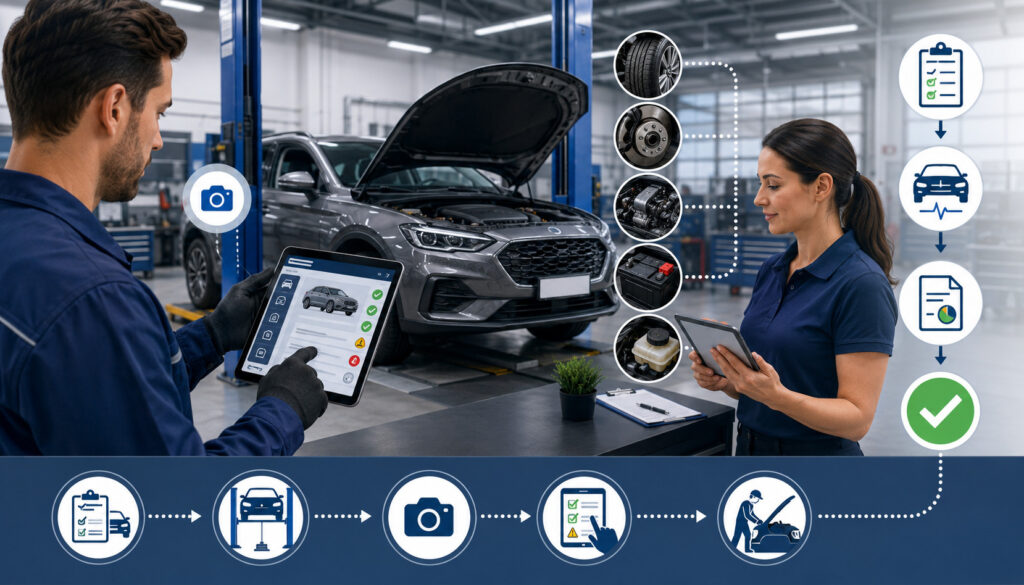
The digital vehicle inspection process usually begins when a repair order is created. The repair order is the central record connecting the customer’s concern, the requested service, inspection findings, estimate, authorization, repair work, invoice, and payment.
Exact procedures vary by business. A quick-service facility may use a short checklist, while a fleet-maintenance operation may require a more detailed inspection connected to service intervals and compliance records.
A typical workflow includes the following steps:
- Create or open the repair order: The service advisor confirms the customer, vehicle, mileage, contact information, requested service, symptoms, warning lights, timing expectations, and preferred communication method.
- Select the appropriate checklist: The technician opens a template suited to the vehicle and service. Examples include maintenance, pre-purchase, seasonal, safety, fleet, tire, brake, or comprehensive multipoint inspections.
- Inspect vehicle systems and components: The technician follows the checklist while remaining alert to concerns outside the standard sequence. The template guides the process but should not restrict professional judgment.
- Record measurements and observations: Measurements may include tire tread depth, brake-lining thickness, battery test results, fluid levels, or other relevant values. Notes should distinguish observed facts from possible causes that require diagnosis.
- Capture photographs or videos: Images may document worn parts, leaks, damage, tire condition, measurements, or areas that are difficult to describe. Media should be attached to the correct finding.
- Categorize each finding: The shop may use colors, labels, or written categories to distinguish immediate concerns from items that can be monitored. The meaning of every category should be defined consistently.
- Review the report for accuracy: Before the customer receives it, the technician or designated reviewer checks measurements, notes, images, vehicle information, condition ratings, and recommendations.
- Send the inspection results: The report may be delivered through text, email, a secure portal, or an in-person presentation. The delivery method should reflect the customer’s preferences and the sensitivity of the information.
- Explain recommended work: A service advisor provides context, answers questions, explains what was found, and distinguishes confirmed repairs from additional diagnostic needs.
- Receive customer authorization: The customer reviews the estimate and decides which work to approve, postpone, or decline. The shop records the approved work, amount, date, time, and person providing consent.
- Add approved work to the repair order: Approved operations, labor, parts, and instructions are added to the production workflow. Parts availability and expected completion timing should be reassessed before promises are made.
- Save the report in the service history: The completed inspection becomes part of the vehicle record, subject to the business’s retention and privacy procedures.
Official consumer guidance for vehicle repairs emphasizes the importance of understanding repair charges, estimates, warranties, and the work being authorized. Digital reports can support those expectations, but each business should verify the authorization and recordkeeping obligations that apply to its operations.
Key Benefits of Digital Vehicle Inspections

Digital vehicle inspection benefits extend beyond replacing a clipboard. When the process is implemented well, inspection information becomes easier to capture, review, explain, and use throughout the repair cycle.
| Benefit | How it helps the shop | How it helps the customer | Requirement for success |
| More complete inspections | Guides technicians through required checks | Reduces the chance that documented items are overlooked | Relevant checklists and careful technician work |
| Greater consistency | Establishes common inspection standards | Creates a more predictable service experience | Training and periodic report reviews |
| Clearer communication | Organizes findings, images, and recommendations | Makes vehicle conditions easier to understand | Accurate descriptions and advisor explanation |
| Faster authorization | Sends reports and estimates remotely | Allows decisions without returning to the facility | Documented consent and reliable messaging |
| Better prioritization | Separates urgent work from future maintenance | Helps customers plan repairs | Honest, consistently defined condition ratings |
| Stronger documentation | Stores measurements, notes, and decisions | Provides a record of findings and recommendations | Secure storage and accurate data entry |
| Improved workflow | Connects inspections with estimates and repair orders | Reduces avoidable waiting and repeated calls | Functional integrations and clear responsibilities |
| More useful service history | Preserves previous conditions and recommendations | Helps track maintenance and developing wear | Correct customer and vehicle matching |
| Better quality control | Allows reports to be reviewed for missing information | Supports more consistent documentation | Constructive management review |
| Reduced paperwork | Limits handwritten forms and physical filing | Makes records easier to receive and retain | Backups and outage procedures |
Improved Accuracy and Consistency
Standardized digital checklists can help technicians complete the same core inspection sequence instead of relying entirely on memory. Required fields can prompt them to record important measurements, add explanations, or choose an appropriate condition rating before closing the report.
This structure may improve vehicle inspection accuracy by reducing missing entries and incomplete documentation. Photographs can support observations, while measurement fields encourage technicians to record specific values rather than writing vague comments such as “low,” “worn,” or “needs attention.”
Consistency does not mean every vehicle receives an identical inspection. A checklist should be adaptable to vehicle type, mileage, service category, customer concern, operating conditions, and available access. A fleet vehicle used under demanding conditions may require checks that are unnecessary for a routine passenger-vehicle service.
Technology also does not prevent dishonest or careless entries. A technician can rush through electronic fields, copy old comments, select inaccurate ratings, or attach an unrelated image. Managers should therefore review inspection quality, provide coaching, and investigate patterns without treating completion speed as the only measure of performance.
Better Communication, Transparency, and Customer Authorization
Customers may find vehicle problems difficult to understand when recommendations are delivered only as component names or technical codes. A digital car inspection can combine an explanation with relevant photographs, measurements, and repair priorities.
For example, instead of sending “replace front brakes,” a report might identify the measured lining thickness, note whether wear is even, show the affected area, and explain what service is being recommended. The service advisor can then discuss cost, timing, available options, and the consequences of postponement without exaggerating the concern.
Visual documentation may support inspection transparency, but it does not automatically create trust. Trust still depends on honest findings, appropriate recommendations, clear pricing, respectful communication, reliable repairs, and a willingness to answer questions.
Digital delivery can also reduce delays when the customer is away from the facility. The report and repair estimate may be sent by text, email, or secure portal, allowing the customer to review the information and authorize approved work remotely.
Remote approval procedures should record what the customer accepted and the amount authorized. Employees should follow up when a report has not been opened or when a safety-related concern requires explanation. Repeated notifications should not be used to pressure the customer.
Clearer Priorities, Documentation, and Service History
Digital inspection findings are often organized by urgency. A useful classification system may include:
- Immediate safety concerns
- Repairs requiring prompt attention
- Preventive maintenance needs
- Items to monitor
- Components in acceptable condition
The categories must have consistent meanings. Marking nearly every recommendation as urgent weakens the value of the system and may make customers question legitimate safety concerns.
Good technician inspection notes explain what was observed, where it was found, and why action may be appropriate. They should distinguish facts from assumptions. A note stating that fluid is visible near a component is not the same as confirming the exact source of the leak.
Digital documentation can preserve measurements, existing damage, customer concerns, technician findings, approved work, declined services, and future recommendations. These records may support continuity, quality control, customer communication, warranty review, and dispute resolution, although documentation cannot guarantee a particular outcome.
Historical reports can also help technicians compare changing conditions. Tire wear, brake measurements, fluid seepage, battery performance, or recurring warning indicators may become more useful when reviewed across several visits.
The records are only helpful when they are assigned to the correct customer and vehicle. Duplicate profiles, inaccurate vehicle identification, missing mileage, or reports attached to the wrong repair order can undermine the service history.
Improved Workflow, Turnaround Time, and Staff Efficiency
A connected automotive digital inspection can move findings directly into an estimate or repair order. Service advisors may spend less time reading handwriting, searching for photographs, or asking technicians to repeat incomplete notes.
Reusable templates, voice-to-text tools, mobile cameras, condition ratings, and automatic repair-order updates may also reduce administrative work for technicians. The goal is to remove unnecessary duplication, not to shorten the inspection so aggressively that important checks are missed.
Digital findings can help advisors prepare estimates, organize recommendations, answer customer questions, and follow up on declined services. Advisors still need enough technical understanding to explain the findings and recognize when a generic software description does not match the technician’s actual observation.
Faster inspections, earlier estimate preparation, remote customer authorization, and better parts planning may reduce avoidable waiting. This can contribute to shorter vehicle turnaround time, especially when delays previously came from lost forms, unclear notes, or difficulty contacting customers.
Digital inspections do not make every repair faster. Complex diagnosis, parts shortages, staffing limitations, equipment availability, outside services, and customer decisions may still extend completion time.
A broader guide to optimizing repair-shop operations explains how inspection, estimating, parts, dispatch, quality control, invoicing, and payment must work together rather than as isolated steps.
Electronic payment processing may be another part of the connected workflow. A customer might review the inspection, approve repairs, receive an invoice, and use a secure payment option without unnecessary re-entry. This repair-shop payment system guide discusses integrations, digital payments, staff training, mobile options, and security considerations.
Visual Evidence, Multipoint Inspections, and Preventive Maintenance
Photos and videos are among the most visible differences between paper and digital inspections. They are particularly useful when a condition is difficult to explain through text alone.
Useful visual evidence may include:
- Fluid leaks or residue
- Uneven tire wear
- Tire damage
- Brake measurements
- Damaged suspension or steering components
- Cracked belts or deteriorated hoses
- Contaminated filters
- Corroded battery connections
- Broken lights
- Underbody damage
- Existing exterior damage
- Missing or loose protective panels
Images should be focused, well lit, and connected to a specific finding. A photograph of a component without context may confuse the customer. When scale or location matters, the technician should include a measurement tool, wider reference view, or supporting note.
Video can be useful for demonstrating movement, noise, looseness, or a leak that is difficult to represent in one image. It should remain brief and relevant. Long, shaky recordings may create more uncertainty than clarity.
Technicians must avoid misleading angles, unrelated photographs, reused images, or media that reveals unnecessary personal information. Customers, documents, addresses, screens, belongings, and unrelated vehicles should not appear in inspection media unless there is a legitimate reason and appropriate handling procedure.
Digital multipoint inspection templates can standardize checks involving tires, brakes, fluids, lights, batteries, filters, belts, hoses, steering, suspension, and visible leaks. However, the checklist must reflect technician qualifications and the actual inspection scope. A quick visual check should not be described as a complete diagnostic evaluation.
Recorded measurements and historical findings can improve preventive maintenance planning. Developing wear may be tracked and discussed before it becomes more serious. Recommendations should still consider appropriate service information, observed condition, operating use, and qualified diagnosis rather than relying only on automated mileage prompts.
Reduced paperwork is another practical advantage. Electronic records may limit handwriting problems, lost forms, physical storage, scanning, and repeated entry. The tradeoff is greater dependence on reliable devices, secure storage, backups, user permissions, and system availability.
Benefits for Fleets, Customers, and Quality Control
Fleet maintenance requires consistent information across numerous vehicles, drivers, technicians, service intervals, and locations. Digital vehicle inspections can provide a standardized vehicle condition report for each unit, making it easier to identify recurring defects, developing wear, overdue work, and vehicles waiting for authorization or parts.
A fleet operator may use inspection history to compare repeated tire wear, fluid loss, brake conditions, driver-reported concerns, or component failures. The information can also support maintenance scheduling, downtime planning, repair-history review, and decisions about whether a vehicle should remain in service.
Standardized templates are especially useful when work is completed at several facilities. Condition categories, measurement methods, image requirements, and escalation procedures should have the same meaning at every location.
Guidance on managing multi-location automotive operations provides broader context for standardizing workflows while accounting for differences in staffing, facilities, and service demand.
For vehicle owners, the practical advantages may include:
- Easier-to-understand inspection results
- Visual documentation of vehicle conditions
- Remote access to reports and estimates
- Better-organized repair priorities
- More informed authorization decisions
- Fewer repeated status calls
- Accessible maintenance records
- Clearer follow-up on monitored conditions
Potential drawbacks should also be considered. Customers may receive too many messages, encounter technical descriptions they do not understand, or feel overwhelmed by a long list of minor observations. Reports should be organized around decisions rather than simply displaying every available field.
Digital inspections can support quality control by allowing managers to review completed reports for missing measurements, unclear photographs, unsupported recommendations, inconsistent condition ratings, or incomplete notes. Recurring problems can indicate a need for training, template changes, equipment calibration, or clearer procedures.
Quality review should focus on legitimate business needs and service standards. It should not become excessive employee monitoring unrelated to inspection accuracy, safety, customer communication, or workflow improvement.
Data Security, Privacy, and Outage Planning
Digital vehicle inspections may contain customer names, contact details, vehicle identification, mileage, service history, inspection images, estimates, authorization records, invoices, and technician notes. Because this information may move between several connected systems, data protection must be part of the inspection process.
Important safeguards include:
- Individual user accounts
- Strong, unique passwords
- Multifactor authentication
- Role-based permissions
- Automatic device locking
- Current operating systems and applications
- Encryption during transmission and storage
- Controlled report-sharing links
- Secure backups
- Audit logs
- Prompt removal of former users
- Vendor-access controls
- Documented retention and deletion procedures
- Employee security training
Multifactor authentication requires an additional verification method beyond a password. Official multifactor authentication guidance explains why customer and business accounts need stronger protection than passwords alone.
Role-based access means giving each employee the information and functions required for the job. A technician may need inspection forms and repair orders but not deposit reports. A service advisor may need customer communication and estimate access but not system-administrator controls.
Shops should also understand how vendors store data, handle backups, approve support access, protect integrations, report security incidents, and return or delete data after the relationship ends. The small-business cybersecurity resource center provides guidance that can help businesses evaluate their information-security practices.
A practical review of automotive cloud security practices covers inspection photos, repair orders, payment records, user permissions, device security, integrations, encryption, and recovery planning in an automotive setting.
No digital system is completely secure or continuously available. Shops need contingency procedures for internet interruptions, damaged devices, software outages, expired subscriptions, vendor failures, and cyber incidents.
An outage plan may include temporary paper forms, manual repair-order numbers, customer contact lists, offline estimate procedures, secure payment alternatives, vendor support details, backup devices, and a process for entering temporary records after service is restored. Employees should practice the procedure before an actual disruption.
Potential Limitations and Challenges
Digital inspections require financial and operational investment. Costs may include software subscriptions, tablets, protective cases, cameras, network upgrades, device management, training, integration work, technical support, and secure data storage.
Employee resistance is another common challenge. Experienced technicians may view a new system as additional administrative work, especially when templates are too long or devices are unreliable. Involving technicians in checklist design can reveal unnecessary fields and improve practical adoption.
Inconsistent use may be more damaging than not using the system at all. One technician might record detailed measurements while another selects only color ratings. Customers then receive different levels of information depending on who performs the inspection.
Other limitations include:
- Poorly designed or excessively long templates
- Weak connections with repair-order and estimating systems
- Duplicate customer or vehicle records
- Repeated data entry
- Slow or damaged devices
- Unreliable internet access
- Incorrect voice-to-text notes
- Low-quality photographs
- Generic recommendations
- Too many customer notifications
- Inaccurate condition ratings
- Overreliance on automated maintenance suggestions
- Inadequate security controls
- Limited data-export options
- Vendor or system outages
Inspection length deserves particular attention. A comprehensive checklist may appear impressive, but unnecessary fields can cause fatigue and encourage box-ticking. Different services may need different templates rather than one oversized checklist for every vehicle.
Automation should also be reviewed carefully. A system may suggest a service based on mileage, but mileage alone does not establish component condition or confirm that work is required. Automated wording must not replace actual inspection findings, appropriate service information, and professional judgment.
Implementation problems are not evidence that digital inspections lack value. They often show that the technology was introduced without first defining the workflow, responsibilities, documentation standards, and customer communication process.
How to Implement Digital Vehicle Inspections

A successful implementation begins with the current repair process rather than a software demonstration. The business must understand what it wants to improve and how inspection information should move after the technician submits the report.
- Map the current inspection process: Follow several repair orders from customer intake through inspection, estimating, authorization, repair, quality control, invoicing, payment, and follow-up. Record where information waits, disappears, or must be entered again.
- Identify documentation and communication problems: Look for illegible notes, missing measurements, delayed estimates, lost photographs, inconsistent ratings, repeated customer calls, incomplete approvals, or service histories that cannot be retrieved.
- Define inspection goals: Goals might include better documentation, faster estimate preparation, more consistent inspections, improved fleet reporting, clearer repair priorities, or reduced manual entry. Avoid vague goals such as “sell more work.”
- Select appropriate checklist categories: Build separate templates for service types when necessary. A maintenance inspection, diagnostic visit, fleet check, tire service, and pre-purchase inspection may require different fields.
- Evaluate compatibility and security: Determine whether the inspection platform connects with existing scheduling, repair-order, estimate, inventory, accounting, messaging, invoicing, and payment systems. Review MFA, permissions, backups, encryption, data ownership, export options, support access, and incident procedures.
- Customize templates carefully: Remove irrelevant fields and define required measurements. Establish what each condition rating means and when a recommendation requires further diagnosis.
- Set photo and note standards: Explain which findings require an image, how measurements should appear, and what details notes must include. Provide examples of useful and unacceptable documentation.
- Train technicians and service advisors: Technicians need practice with templates, devices, measurements, photographs, notes, and job-status updates. Advisors need training in reviewing reports, building estimates, explaining recommendations, recording authorizations, and handling customer questions.
- Test with sample vehicles: Run several common service scenarios before full deployment. Include routine maintenance, complex diagnosis, declined work, fleet service, duplicate records, unavailable parts, and an interrupted connection.
- Create customer communication procedures: Decide when reports are sent, who reviews them, which findings require a phone conversation, how unanswered messages are handled, and how customers can ask questions.
- Establish outage and backup plans: Prepare temporary forms, manual numbering procedures, vendor contacts, backup devices, secure payment methods, and record-reconciliation instructions.
- Monitor and refine the workflow: Review employee feedback, customer questions, missing fields, inspection time, approval delays, and integration failures. Adjust templates and training based on evidence rather than assumptions.
Measuring Performance and Avoiding Common Mistakes
Digital inspection performance should be evaluated through a combination of speed, completeness, accuracy, workflow outcomes, customer feedback, and service quality. No universal benchmark applies to every business.
A quick-service operation will have different inspection times from a diagnostic facility. A fleet shop may prioritize consistent defect reporting, while a general repair facility may focus on estimate preparation and customer communication.
Useful indicators include:
- Inspection completion rate
- Missing-field frequency
- Average inspection time
- Frequency of reports returned for correction
- Estimate preparation time
- Time from estimate delivery to customer decision
- Vehicle turnaround time
- Repeated inspection findings
- Comeback repairs
- Customer questions or complaints
- Technician adoption
- Declined-service follow-up
- System or device downtime
- Duplicate data-entry frequency
- Reports sent without advisor review
Metrics should be interpreted in context. A longer inspection may reflect a complex vehicle condition rather than poor productivity. A delayed authorization may result from customer availability rather than advisor performance.
The guide to automotive data analytics for shop owners explains how operational information can be converted into useful decisions without treating individual numbers as complete explanations.
Common digital inspection mistakes include:
- Using one oversized checklist for every service
- Sending reports without explanation
- Reusing old photographs
- Writing vague recommendations
- Marking nearly every finding as urgent
- Failing to record actual measurements
- Allowing inconsistent condition ratings
- Skipping technician or advisor training
- Ignoring customer privacy
- Attaching images to the wrong finding
- Relying entirely on automated wording
- Failing to review reports before delivery
- Measuring only inspection speed
- Operating without an outage procedure
The best corrective action depends on the cause. Missing measurements may require a template change, training, accessible tools, or stronger review. Poor photographs may require lighting improvements and examples rather than discipline alone.
Managers should use performance information for process improvement and coaching. Employees performing the inspections can often explain why a field is repeatedly skipped or why a particular step creates unnecessary delay.
Frequently Asked Questions
What is a digital vehicle inspection?
A digital vehicle inspection is an electronic method of documenting a vehicle’s condition. A technician uses a smartphone, tablet, camera, workstation, or connected system to complete an inspection checklist and record observations.
The report may include measurements, condition ratings, photographs, videos, technician notes, customer concerns, and repair recommendations. It can often be connected with a repair order, estimate, customer authorization, invoice, and vehicle service history.
The term does not describe one universal inspection. A digital inspection may be a short maintenance check, a safety-focused review, a fleet inspection, or a comprehensive multipoint evaluation. The scope should be explained accurately so customers understand what was and was not examined.
What are the main benefits of digital vehicle inspections?
The main benefits include more consistent checklists, clearer documentation, better visual evidence, faster report delivery, easier repair prioritization, more organized service history, and closer connections between inspections and the wider repair workflow.
Digital inspections may also reduce handwriting problems, missing forms, repeated data entry, and delays caused by customers being away from the facility. Managers can review reports for quality, while fleet operators can compare findings across vehicles and locations.
These advantages depend on accurate technician work, effective templates, employee training, dependable integrations, secure data handling, and clear customer explanations. Software alone does not guarantee better inspections, higher approval rates, or faster repairs.
How do digital inspections differ from paper inspections?
Paper inspections rely primarily on handwritten forms, while digital inspections use electronic fields, structured checklists, media attachments, and searchable records. Digital reports can usually be sent remotely and connected to estimates or repair orders.
Paper forms do not depend on internet access or software availability, making them useful during outages. They may also be sufficient for a small operation with a simple, well-managed process.
Digital records are generally easier to retrieve and compare, but they create responsibilities involving account security, device protection, backups, permissions, and data retention. The best format is the one that supports accurate, consistent, secure, and understandable documentation.
Can digital vehicle inspections improve customer trust?
Digital inspections may support trust by showing organized findings, measurements, photographs, and clear repair priorities. Visual evidence can help customers understand conditions they cannot easily see for themselves.
However, a digital report does not prove that every recommendation is correct. Customers may still question unclear images, unexplained urgency, generic descriptions, or estimates that do not match the documented condition.
Trust depends on accurate inspection work, honest recommendations, reasonable explanations, clear pricing, proper authorization, dependable repairs, and respectful communication. Advisors should be prepared to explain what the evidence shows, what remains uncertain, and whether additional diagnosis is required.
Do digital inspections reduce vehicle turnaround time?
They can reduce avoidable waiting when the previous process involved lost forms, unreadable handwriting, delayed estimate preparation, repeated technician questions, or difficulty reaching customers. Remote report delivery and electronic authorization may also shorten decision time.
Digital tools cannot eliminate every cause of delay. Complicated diagnosis, unavailable parts, limited technician capacity, equipment problems, outside services, or postponed customer decisions may still extend the repair.
Shops should measure each stage separately, including inspection completion, estimate preparation, customer authorization, parts arrival, repair start, quality control, and checkout. This helps management identify whether the digital inspection process is improving the actual bottleneck.
What should a digital inspection report include?
A useful report should identify the vehicle, mileage, repair order, inspection scope, technician, and relevant customer concerns. Each finding should describe the component, observed condition, measurement when appropriate, priority, and recommended next step.
Photographs or videos should be included when they make the condition easier to understand. The report should distinguish confirmed findings from possible causes requiring additional testing.
It may also document acceptable components, declined services, approved work, existing damage, and future monitoring recommendations. Reports should avoid unnecessary personal information, unsupported urgency, generic automated descriptions, and technical terminology that is not explained.
How can repair shops protect digital inspection data?
Shops should use individual logins, strong passwords, MFA, role-based permissions, updated devices, encryption, controlled sharing, secure backups, audit logs, and prompt removal of former users. Inspection devices should lock automatically and should not be shared without accountability.
Vendor controls are also important. Businesses should understand where data is stored, how support access works, whether information can be exported, how integrations are protected, and what happens to records after cancellation.
Employees need training on phishing, incorrect recipients, lost devices, personal account use, and appropriate photo handling. No control eliminates all risk, so an incident response and business continuity plan should accompany preventive safeguards.
Are digital inspections useful for fleet vehicles?
Yes. Digital inspections can help fleet operators organize vehicle condition, maintenance schedules, recurring defects, downtime, repair history, approvals, and follow-up across multiple units.
Standardized reports make it easier to compare findings from different technicians or locations. Fleet managers can review developing wear, repeated driver concerns, previously postponed work, and vehicles waiting for parts or authorization.
The process still requires accurate unit identification, mileage or usage information, consistent condition definitions, qualified technicians, and dependable records. Fleet inspections should be designed around vehicle use, maintenance requirements, operating conditions, and organizational procedures rather than copying a general consumer-vehicle checklist.
Conclusion
The benefits of digital vehicle inspections come from turning inspection findings into accurate, organized, and useful information. Standardized checklists, measurements, technician notes, photos, videos, condition ratings, and connected service records can improve consistency, communication, documentation, repair planning, and quality control.
Those benefits depend on more than installing vehicle inspection software. Technicians must inspect carefully, service advisors must explain findings accurately, managers must review documentation constructively, and the business must protect customer and vehicle data.
Templates should match the service being performed, visual evidence should be relevant, and repair priorities should reflect actual conditions rather than exaggerated urgency. Integrations should reduce duplicate work without creating confusion, while outage procedures should keep essential operations moving when technology is unavailable.
When digital vehicle inspections are built into the wider repair workflow thoughtfully, they can help customers make informed decisions and help automotive service businesses maintain clearer records, stronger inspection consistency, better operational visibility, and more dependable communication.